
OpenD overview
A docs platform where "which release applies" and "who may see this" are one rule, written once in the content and applied everywhere it is shown.
Authors write DITA in a Git repository or in a visual editor on the web. The build compiles it into a release snapshot that keeps every element's applicability, and each reader is served only what their release and entitlements allow: on the docs site, in the help panel inside your apps, in search, and in PDF manuals.
One rule for release and entitlement
Most documentation tools filter by release when they build, then handle access in a separate layer, if at all. In OpenD, any map entry, topic or element can carry standard DITA filtering attributes, and one filter decides both questions:
productandfeatureare matched against what the reader's organization is entitled to.releasetakes version ranges, such as0.1.., and is matched against the release the reader runs.audience,platformand the other DITA attributes are filtered once, at build time, with a DITAVAL file.
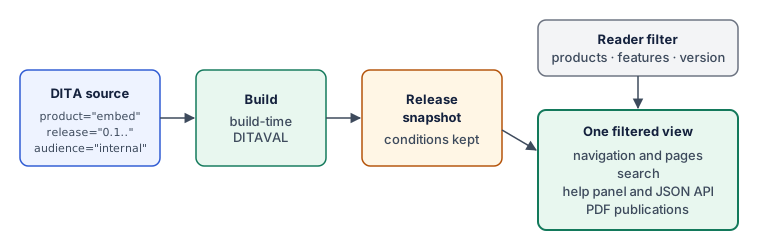
The filter is fail-closed and never leaks through links, titles or search: a link to a page the reader cannot see renders as plain text, and a hidden page answers with the same 404 as a missing one. See Applicability attributes.
Architecture
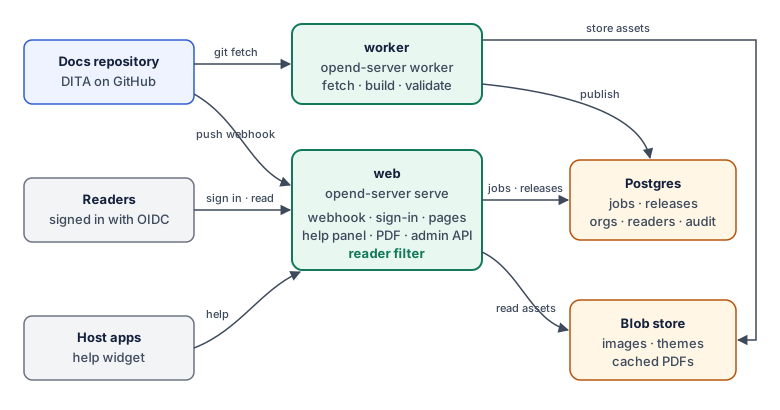
The same packages run on an author's laptop and on the server, so what an author previews is what readers get.
- Locally, the
opendcommand validates a docs project, previews it as any reader, and prints PDF publications. - Hosted, a push to the docs repository fires a GitHub webhook. A worker builds and validates the commit, and the web service serves signed-in readers their filtered pages. A push that fails validation never goes live.
- In the browser, the web editor lets authors who do not use Git change the same repository. They save to their own branch and publish through a pull request, so a change still goes live only by a merge and a passing build.
- In your apps, a small widget opens a help panel on the topic for the current screen, filtered for the signed-in user.
What release 0.2 includes
- The build and filter core, the
opendCLI and a local previewer. - The hosted path: push to publish, OIDC reader sign-in, filtered delivery and an admin API.
- Context-sensitive help embedded in your own web apps.
- PDF publications from bookmaps, filtered per reader.
- A web editor for authors who do not use Git, with live preview and publishing through pull requests.
- A version picker, so readers can choose which version of the docs they read.
Multi-tenancy and an operator console come later and reuse the same packages. See and Release notes for 0.1.
Where to go next
- Install the CLI from a checkout
- Applicability attributes
- Context-sensitive help in your apps
- Edit docs in the browser
- Hosted architecture: push to publish
Questions? Ask the operator of your docs site.